The client asks you to fix a leaking pipe while you're already on site doing a kitchen remodel. "Sure, I'll take care of it," you say. You agree on a price verbally. You do the work. You drive home.
By the next morning, you've forgotten half the details. What exactly did you agree on? Was it $800 or $850? Did the client say they'd cover the drywall patching too? You can't remember - and now it's your word against theirs.
This is the #1 way contractors lose money on construction projects. Not through bad estimates or slow workers - through undocumented change orders that never make it to paper.
What Is a Construction Change Order?
A change order is a formal document that modifies the original scope, cost, or timeline of a construction project. It's the written agreement between you and the client that says: this extra work was requested, here's what it costs, and here's what's included.
Change orders happen on virtually every project. A homeowner decides they want an extra outlet. A GC discovers rotten subfloor that wasn't in the original scope. The architect changes a spec. These are all change orders - and every single one needs to be documented.
Without a written change order, you have no legal basis to charge for extra work. Courts across the U.S. have ruled repeatedly that verbal change orders are extremely difficult to enforce, especially when the original contract requires written modifications.
The Real Problem: No One Writes Them Down on Site
Here's what actually happens on a job site. Be honest - you've lived this scenario:
- The client or GC walks up to you mid-task and asks for something extra
- You discuss it, agree on a rough price, and shake hands
- You do the work because it's easier to just knock it out while you're there
- You think, "I'll write it up tonight when I get home"
- You get home exhausted, eat dinner, deal with family, and go to bed
- Next morning you're on a different job site - the change order never gets written
Two weeks later, when it's time to invoice, you vaguely remember the extra work but can't recall the details. You either skip it entirely (losing money) or write a rough number that the client disputes (losing time and trust).
Why does this keep happening?
It's not because contractors are lazy or disorganized. It's because the tools available don't match the reality of the job site:
- Paper forms - You'd need to carry blank change order forms, fill them out by hand on a dusty tailgate, and hope the client signs right there. Nobody does this.
- Spreadsheets - Great for the office. Useless when you're standing on a ladder with drywall dust in your eyes.
- Email - By the time you sit down to write an email describing the extra work, you've already forgotten half the conversation.
- Notes on your phone - You type "fix pipe kitchen extra $800" and three weeks later you have no idea what that means.
The gap isn't knowledge - every contractor knows they should document change orders. The gap is having a tool that works as fast as the conversation happens.
What Undocumented Change Orders Actually Cost You
Let's put real numbers on this. Say you're a plumbing contractor doing 30 jobs a year. On average, 60% of those jobs have at least one change order. That's 18 change orders per year.
If you lose or forget to document even half of them - that's 9 change orders at an average of $500-$1,500 each:
And that's just the direct cost. The indirect costs are worse:
- Payment disputes - Clients challenge charges they don't remember agreeing to
- Scope creep - Without documentation, extra work becomes "part of the job" in the client's mind
- Legal exposure - If a dispute goes to court, the contractor without paperwork almost always loses
- Damaged relationships - Arguments about money destroy repeat business and referrals
Do Change Orders Need to Be in Writing?
Short answer: yes, always.
Most construction contracts include a clause requiring all changes to be in writing and signed by both parties. Even when a contract doesn't explicitly require it, courts strongly favor written documentation. Here's why:
- Verbal agreements are notoriously unreliable - people remember conversations differently
- Construction disputes often happen months after the work, when memories have faded
- Written change orders with signatures create a clear paper trail for payment claims and dispute resolution
Even if you have a great relationship with a client today, that relationship can change when money is involved. A written change order protects both sides - it's not about mistrust, it's about clarity.
What Every Change Order Should Include
A professional change order document needs to cover these elements:
| Element | What to Include | Why It Matters |
|---|---|---|
| Change order number | Unique ID (e.g., CO-2026-79076) | Tracks the document and connects it to the project |
| Date and validity | Issue date + expiration date | Creates urgency and prevents open-ended commitments |
| Project description | Clear description of the additional scope | Defines exactly what work is included (and what isn't) |
| Line items | Category, description, qty, unit, unit price, amount | Shows the client exactly where the money goes |
| Labor and materials split | Separate line items for labor hours and material costs | Transparency that builds trust and reduces disputes |
| Subtotal, tax, total | Clear math with applicable tax | No ambiguity about the final number |
| Terms and conditions | Payment terms, warranty, scope limitations | Legal protection for both parties |
| Signature lines | Contractor signature + client acceptance | Proof of mutual agreement |
That's a lot of detail - which is exactly why most change orders never get written. Who has time to create a document like that while standing on a job site?
The Fix: Voice Record It, Get a Professional PDF
Here's where the game changes. What if you could create a fully detailed, professional change order document in under 60 seconds - from your phone, on the job site, the moment the conversation happens?
With PlanUpPro, that's exactly how it works:
No typing. No templates. No going home and trying to remember what you agreed on. You speak it, the app builds it.
Real Example: Kitchen Plumbing Emergency Change Order
A contractor is on site doing a kitchen remodel when the homeowner reports a leaking pipe behind the wall. The plumber opens up the wall, finds damaged copper pipes, and needs to repair them - plus patch the drywall afterward.
Instead of scribbling on a notepad or promising to "send something over later," the contractor opens PlanUpPro and records a quick voice prompt:
"Change order for John Smith, Smith Co. Kitchen plumbing pipe repairs. I need about 3 hours to diagnose and access the pipe areas at $85 an hour, another 4 hours to repair and replace the damaged pipes and test for leaks, also at $85. Materials - copper pipes, fittings, solder, flux, and plumbing supplies, about $145. Plus drywall patch material and paint for the wall access areas, about $60. Tax is 6%. Payment terms net 60."
From that single voice prompt, PlanUpPro generated this complete, professional change order:
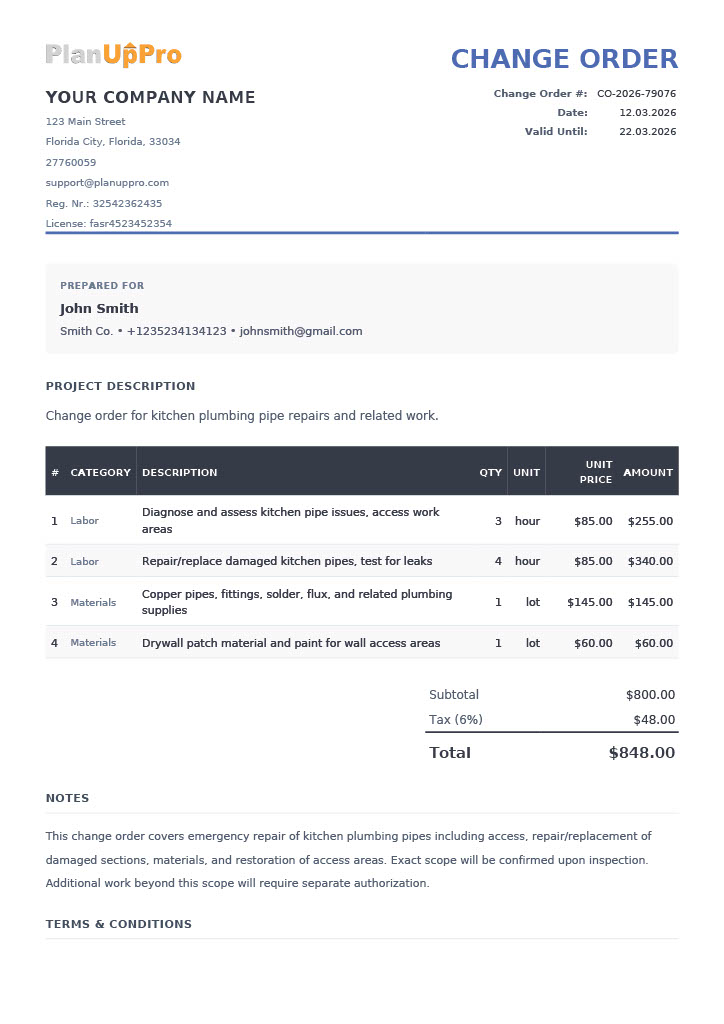

What one voice prompt produced
The whole thing took less than a minute. The contractor can show it to the client on the spot, get a signature, and have a documented, legally defensible change order before the work even starts.
Compare that to the alternative: driving home, trying to remember the details, spending 20 minutes typing up a document in Word, emailing it to the client, waiting for a reply, and hoping the numbers match what you actually discussed.
Why Most Contractors Don't Document Changes (and Why That Needs to Stop)
Let's be real about why change orders go undocumented. It's not one reason - it's a combination:
| What contractors say | The reality |
|---|---|
| "I'll remember it later" | You won't. After 8 hours of physical labor, details blur together. |
| "The client is right here - we agreed verbally" | Two weeks from now, neither of you will remember the exact numbers. |
| "It's a small job, not worth the paperwork" | Small undocumented jobs add up to thousands in lost revenue per year. |
| "I don't have a template with me" | You have your phone. That's all you need with the right app. |
| "I don't want to look too corporate" | Clients respect contractors who are professional. It builds trust. |
The construction industry loses billions every year to poorly documented changes. The contractors who survive and grow are the ones who document everything - and they do it at the moment it happens, not days later.
Best Practices for Construction Change Order Management
Whether you use PlanUpPro or another method, follow these rules:
1. Document the Change Before You Start the Work
This is the golden rule. Once you've done the work, you lose all leverage. The client can say "I never agreed to that price" or "I thought that was included." Get the change order signed before you pick up a tool.
2. Be Specific About What's Included - and What Isn't
Look at the notes section in the example above: "Additional work beyond this scope will require separate authorization." This one line prevents scope creep. Without it, the client might assume your $848 change order covers anything related to the kitchen plumbing forever.
3. Separate Labor From Materials
Clients want to see where their money goes. Bundling everything into one line item ("Kitchen pipe repair - $848") invites questions. Breaking it into labor hours at a specific rate and materials at cost with markup is transparent and professional. This is the same principle that applies to pricing any construction job.
4. Number Every Change Order
Use a consistent numbering system (CO-001, CO-002, or CO-2026-79076). When it's time to write the final invoice, you can reference each change order by number. This eliminates confusion and speeds up payment.
5. Include an Expiration Date
Notice the "Valid Until" date on the example document (10 days from issue). This prevents a client from sitting on a change order for months and then trying to hold you to old pricing when material costs have gone up.
6. Keep Every Change Order on File
Even after the project is done and paid for, keep your change orders. They're part of your project documentation and can be critical if a warranty claim or legal dispute comes up months or years later.
How Change Orders Connect to Your Invoices and Estimates
Change orders don't exist in isolation. They're part of a chain:
When each step is documented, the invoice practically writes itself. When change orders are missing from the chain, you get disputes, delays, and unpaid work.
Frequently Asked Questions
Can a contractor get paid for extra work without a written change order?
Technically, yes - but it's extremely difficult. Courts generally require some form of written documentation. Even text messages or emails can help, but a formal change order with signatures is by far the strongest legal position. Don't gamble your income on verbal agreements.
What happens if the client refuses to sign a change order?
Don't do the work. If a client won't sign a change order, they're telling you they don't intend to pay for it. Politely explain that you need written approval before starting any additional work. A professional client will understand - and if they don't, that's a red flag.
How do I handle emergency changes that need to happen immediately?
Emergency work happens - a burst pipe can't wait for paperwork. In these cases, do the work, but document it as soon as physically possible. Voice-record the details on your phone immediately after. With PlanUpPro, you can have a formal change order PDF in under a minute, even from the parking lot before you drive home.
Should I charge for writing change orders?
The time you spend creating a change order is part of your overhead and should be factored into your pricing strategy. Don't bill the client separately for "administrative time" - but make sure your hourly rate or markup covers this kind of operational work.
How many change orders are normal on a project?
On residential remodels, 2-5 change orders per project is typical. On commercial projects, it can be 10-50+ depending on the scale. The number isn't the issue - it's whether they're documented. Even 20 change orders on a project are manageable if every single one is written, signed, and filed.